Love watching BTS videos? Turn a short clip into a Korean lesson.
With Language Reactor, you can follow Korean subtitles, check English translations, and click unfamiliar words to look up their meanings. This guide shows you how—with real screenshots and simple practice activities.
Before you start: This is a Korean listening activity in Korean Lab. If you are still learning the letters, follow Learning Roadmap first. You can return to the clip after a few minutes of syllable-building practice.
Today's mission: one short clip, three useful words, one sentence of your own. No need to turn an entire episode into homework.
This guide includes real annotated screenshots, a beginner-friendly practice routine, and a mini language lesson built around everyday words visible in the example.
Capture note: These are real screens from Language Reactor's website, captured on October 12, 2026. The example is a BTS fan-edit clip from 꾸러기타니BTS, not an official BANGTANTV upload. We verified the settings, subtitle display, and word lookup. The embedded video stayed loading in this browser, so playback and synchronization were not verified here. The screenshots preserve that state. Our practice sentences below are original teaching examples, not quotations attributed to BTS.
Your learning goal
By the end of this activity, aim to do three things:
- Find Korean subtitles and a supporting translation without mixing up the two languages.
- Explain the meaning of a few useful words in context.
- Say or write one short sentence about your own life.
If you can already read some Hangul, use the main route. If Hangul is new, start with the short preparation section near the end and choose a one-word task. If you understand simple Korean conversations, increase the challenge by checking the translation only after your first listening attempt.
The clip itself is authentic entertainment, not graded beginner material. We make the task manageable; we do not pretend that all BTS content is easy Korean.
1. Choose your clip like a learner, not just a fan
A favorite artist gives you a reason to return. The specific clip determines whether you have something useful to work with.
For close listening, look for a short spoken exchange with a visible situation: eating, choosing an item, greeting someone, describing a feeling, or explaining a simple plan. A clear moment with one speaker is usually easier to focus on than several members shouting over music.
| Content | A useful first task | What to watch for |
|---|---|---|
| A short behind-the-scenes exchange | Identify one action or everyday expression | Background noise and informal endings |
| A food or daily-life clip | Find one noun and one reaction | Fast editing and incomplete captions |
| A short interview answer | Identify the topic and a repeated phrase | Longer sentences and abstract vocabulary |
| A variety-game highlight | Notice an instruction or reaction | Overlapping voices and inside jokes |
| A music video | Enjoy the song and notice familiar words | Lyrics may use poetic language and stretched pronunciation |
Music can be part of your Korean life. For this particular lesson, however, we focus on spoken interaction, so you can connect a phrase to an everyday situation.
For official BTS material, start from BANGTANTV and check each video's subtitle options. A channel name alone does not guarantee Korean captions or compatibility with every Language Reactor feature. Fan clips can demonstrate the interface, but edited context and subtitle quality deserve extra attention.
A quick selection check
Before committing to a clip, ask:
- Is Korean actually spoken in this part?
- Is there a usable Korean caption track or Korean text in the learning interface?
- Can I identify what is happening?
- Is there one word or phrase I might use myself?
- Can I work with a small section instead of the whole video?
If the answer to most of these is no, choose a different clip. That is good material selection, not giving up.
2. Know which Language Reactor screen you are using
Language Reactor offers a desktop browser extension, and its website also has a catalogue with a video-learning interface.
On youtube.com: the extension route adds tools to supported video pages. Start with the official Chrome Web Store listing, check that the publisher is Dioco, and follow the installation prompts in supported desktop Chrome. The official listing specifies Windows and macOS computers.
Inside languagereactor.com: open the Media catalogue and select YouTube material. The screenshots in this guide show this route.
The screenshots below demonstrate the Language Reactor website, not an installed extension on youtube.com. We could not install the extension in the capture browser, so this is not an extension-installation walkthrough. Use the official listing for installation requirements. Account requirements, paid features, and subtitle support can vary.
You do not need to configure every feature before beginning. First get a suitable clip, Korean text, and a translation you understand.
3. Set Korean as the study language
Open Settings in Language Reactor and find Basic settings.
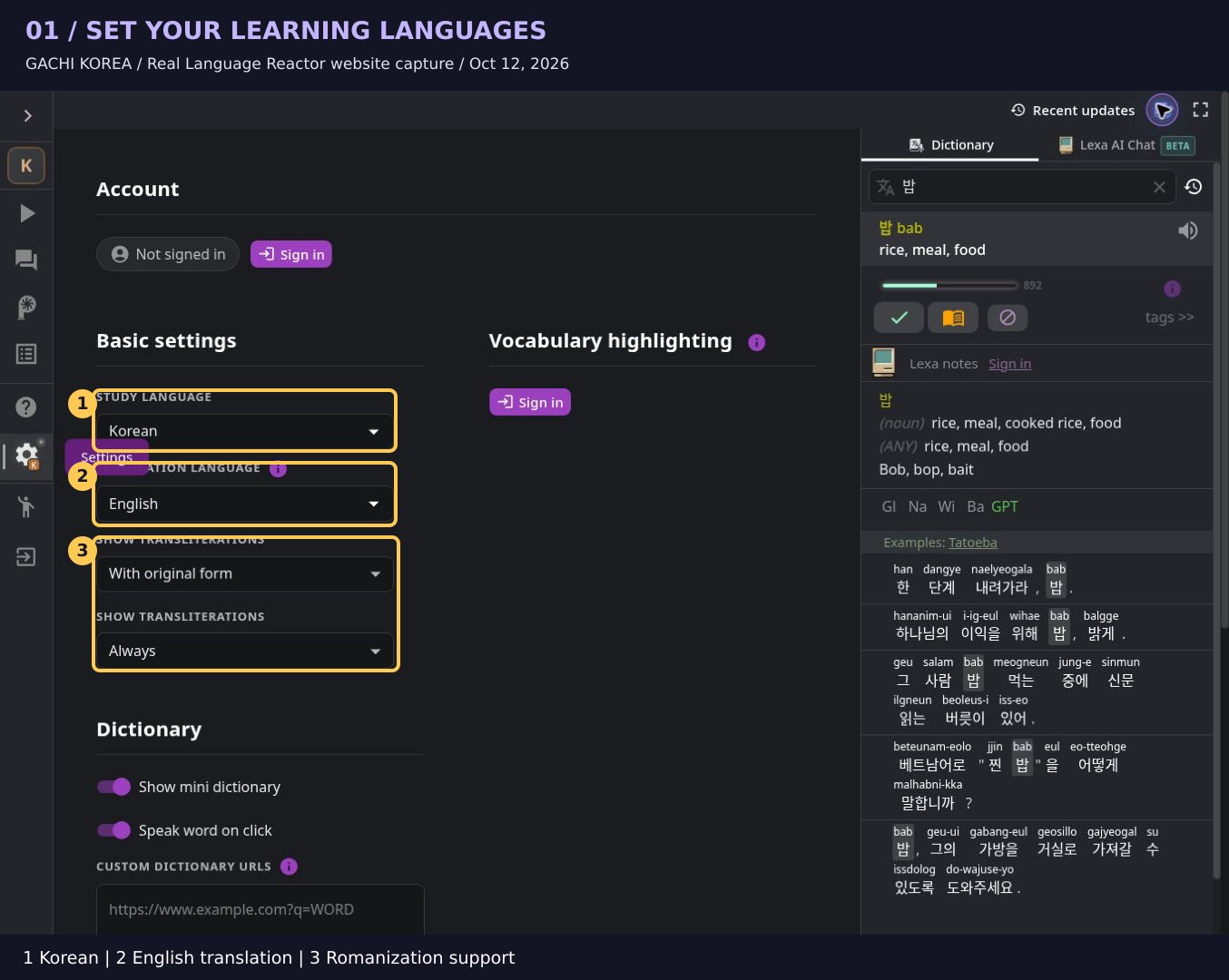
Follow the numbered highlights:
1 — Study language: Korean. This is the language you want to learn.
2 — Translation language: English. Choose English if it is your support language, or another language you understand well.
3 — Show transliterations. Our captured settings displayed romanization together with the original Korean form. This can provide temporary reading support, but it is not a precise pronunciation guide.
| Setting | Example choice | Purpose |
|---|---|---|
| Study language | Korean | The language you are studying |
| Translation language | English | Help with meaning |
| Transliterations | With original form, as shown | Optional letter-based support |
| UI language | Your preferred interface language | Menu labels, not the learning target |
Try this: point to the Korean setting and say, “This is what I am learning.” Point to English and say, “This helps me check meaning.” That small distinction prevents a surprisingly common setup mistake.
If you already read Hangul comfortably, let the Korean text do more of the work. You do not have to remove every support immediately; reduce it when you can still understand the task.
4. Find BTS content in the YouTube catalogue
Open Media → YouTube. Use Search Channels to look for an artist or channel.
In our session, the exact query “BANGTANTV” did not return the expected official channel. Searching BTS 방탄소년단 아이돌 returned BTS-related fan channels. Search results change, so check the channel identity rather than assuming every result is official.
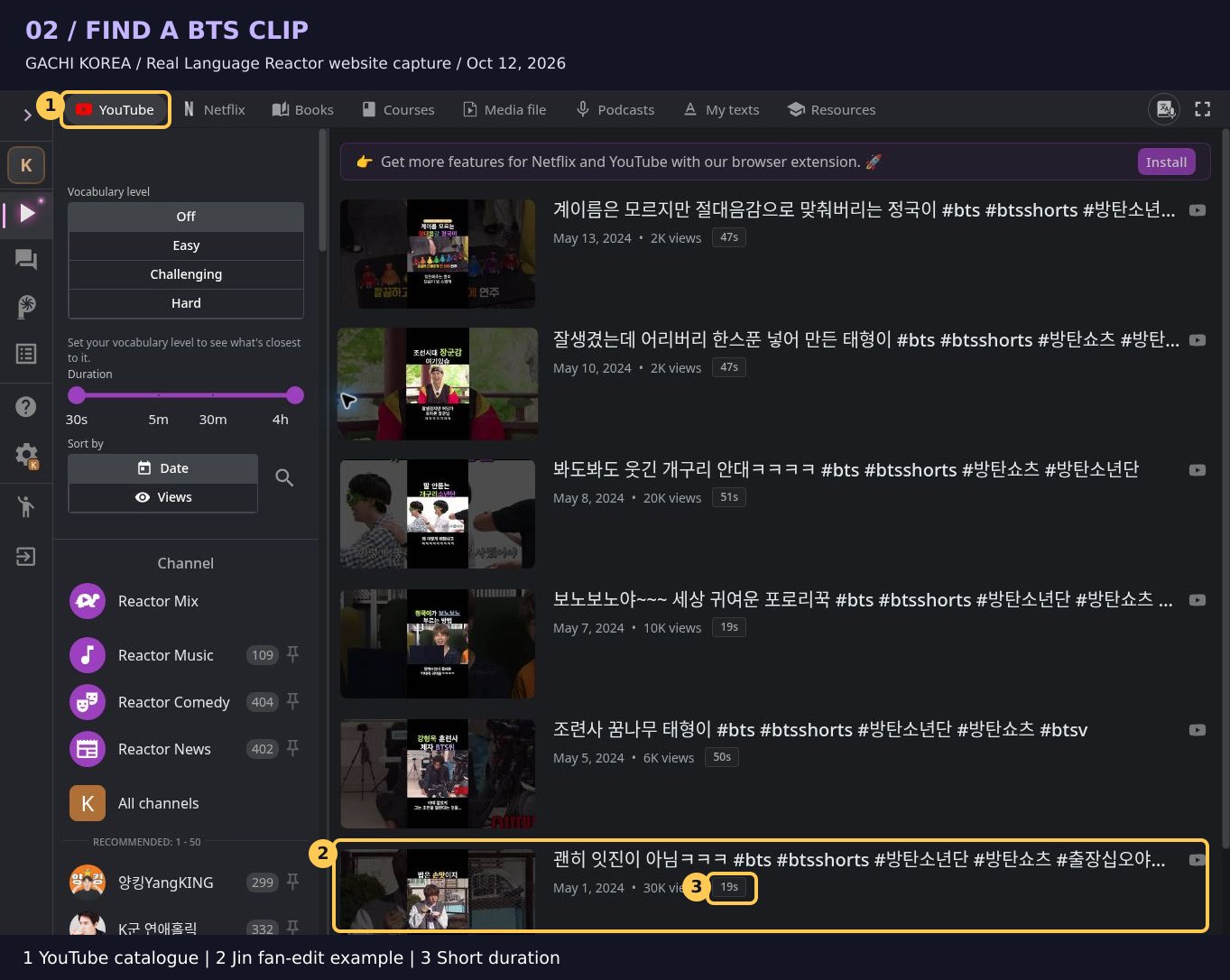
1 — YouTube: check that you are in the video catalogue.
2 — Clip entry: our example is the short Jin clip titled “괜히 잇진이 아님ㅋㅋㅋ” from 꾸러기타니BTS.
3 — Duration: the catalogue lists it as 19 seconds. That makes it a small example to inspect, but short does not automatically mean linguistically easy.
Open the example learning page.
Before pressing play: predict a topic from the title or thumbnail. Food? A game? A reaction? Keep it as a prediction until you check the actual clip.
For your regular learning, use official artist or broadcaster uploads where possible and select a clear excerpt with reliable captions. This fan-edit example is here to demonstrate the controls we could inspect.
5. Learn the layout before chasing every word
After you open the clip, locate the Korean text and its translation.
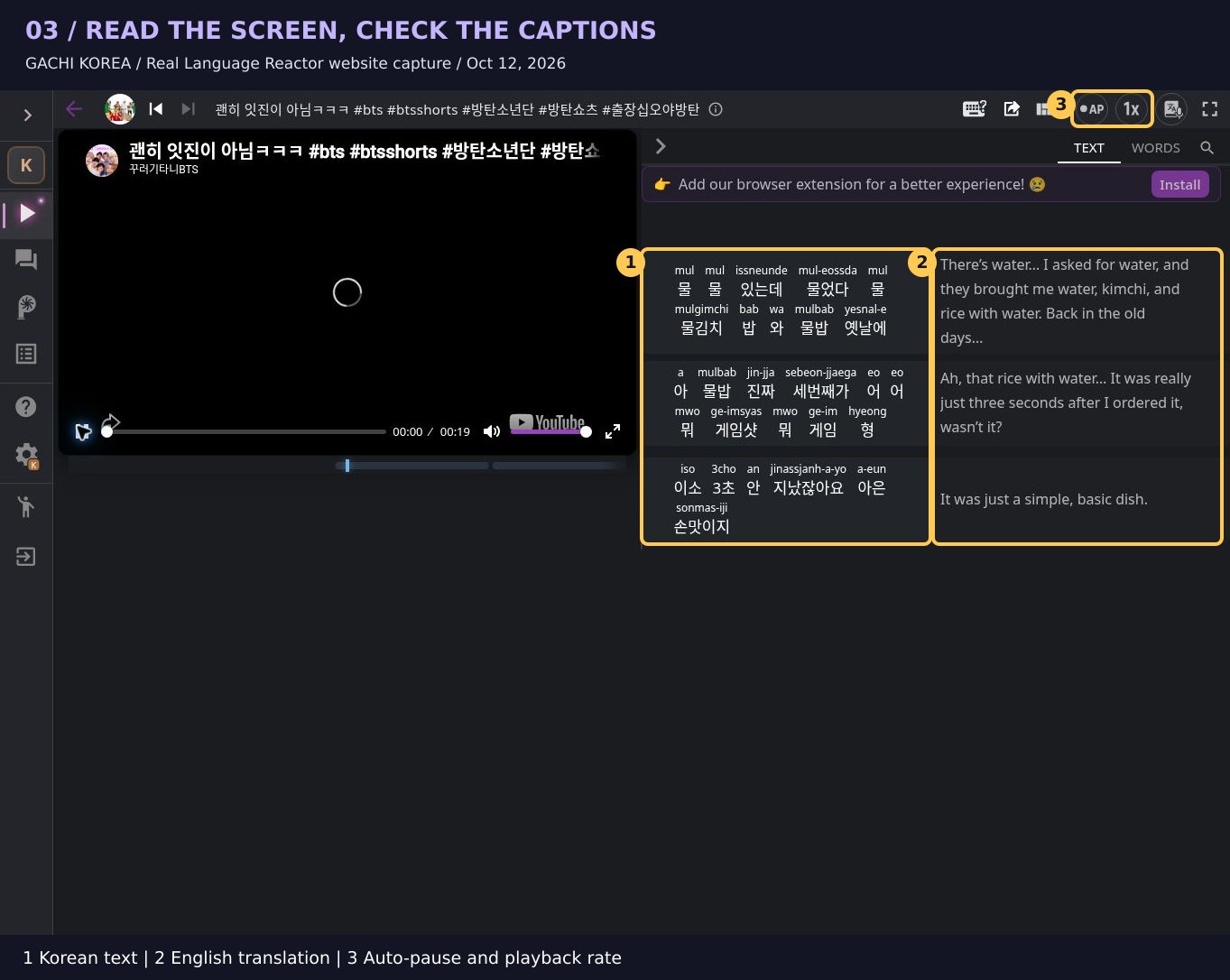
1 — Korean text. This is where you connect the written forms to the speech. Our screen also shows romanization above the Hangul.
2 — English translation. Consult it when you need meaning, then return to Korean.
3 — Playback tools. The toolbar labels AP as Auto-pause and the speed control as Playback rate. These can support short listening work when playback is functioning. We observed the controls but could not verify their playback effects in this session.
The black player area is the loading state we encountered. The text loaded independently. A visible transcript does not by itself prove that the video is playing or synchronized correctly.
Give each pass a different job
When the video plays on your device, try this sequence:
- Pass 1: get the situation. What is happening? Do not stop for every word.
- Pass 2: connect sound and text. Work with one short line in Korean.
- Pass 3: check meaning. Consult the translation or one dictionary entry.
- Pass 4: retrieve. Look away and say what you remember.
A complete beginner can look at both languages from the start. A more confident learner can try the first pass without the translation. The goal is an appropriate challenge, not a test of how long you can remain confused.
6. Click a word: what does 밥 mean?
In our example, clicking 밥 in the Korean text opened the Dictionary panel.
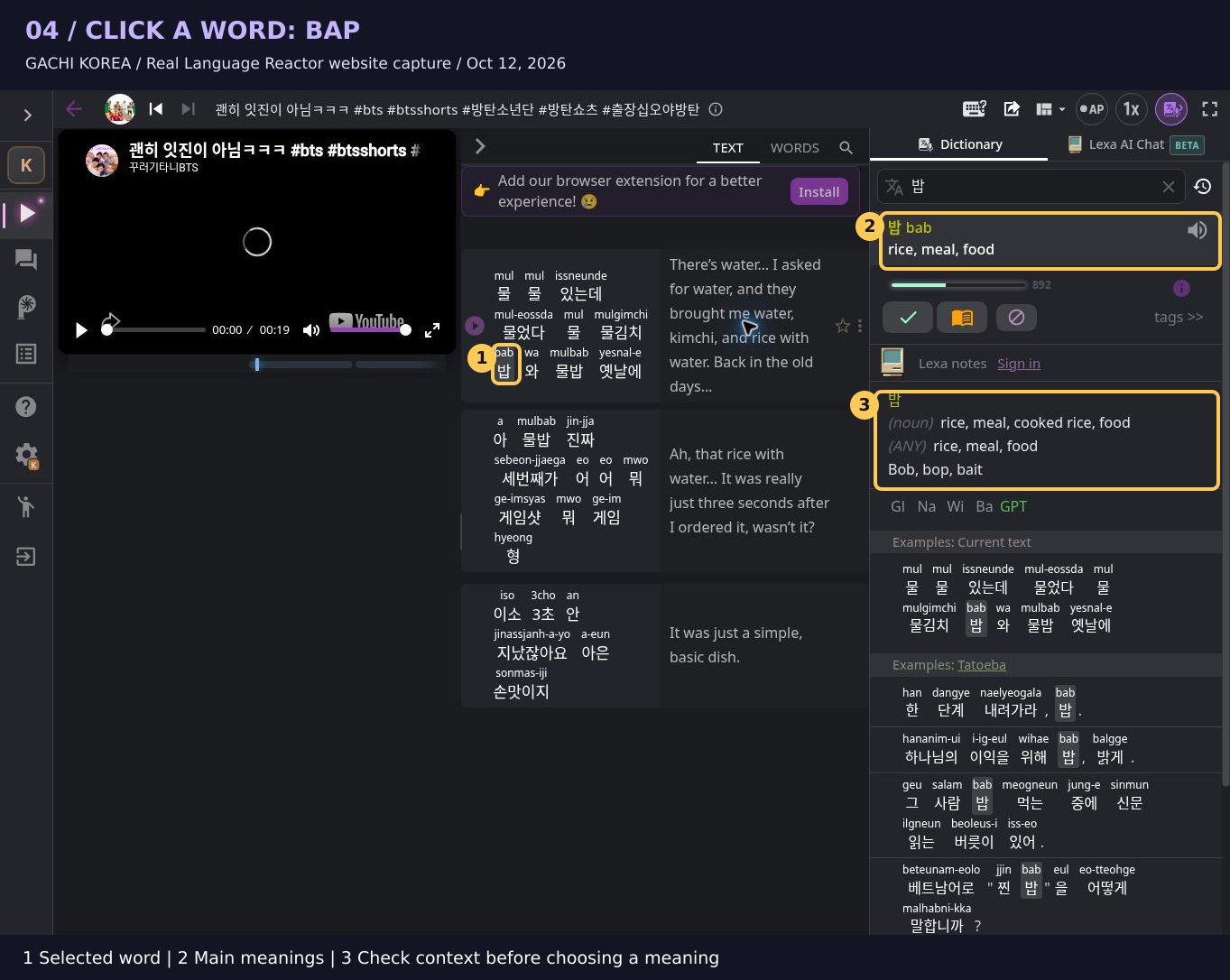
1 — Selected word: 밥 in the text.
2 — Main meanings: the panel displays “rice, meal, food.”
3 — Additional entries: use the context to choose a relevant meaning. A long dictionary list is not a set of interchangeable translations.
This is a useful teaching moment. 밥 can mean cooked rice, but it can also refer to a meal. In 밥 먹었어요?, the speaker is commonly asking whether you have eaten—not conducting a survey about rice.
The panel in our session also included unrelated-looking alternatives and imperfect example sentences. Use the tool to generate a possible interpretation, then check whether it fits. A dictionary is support for reading, not a substitute for judgment.
Keep a tiny word note
Use four fields:
| Word | Meaning here | Situation | My sentence |
|---|---|---|---|
| 밥 | meal / cooked rice, depending on context | Food or eating | 밥 먹었어요. |
Keep the distinction between what the clip says and what you created. The sentence in the final column is our teaching example, not a verified line spoken by Jin.
7. Four useful words to take beyond the clip
The following words are visible in the example's displayed text. Their appearance in the transcript is not a guarantee that the automatic caption accurately represents every spoken word.
The stars below are our beginner-priority rating, not an official frequency score: ★★★ means “learn early,” and ★★☆ means “useful, but pay attention to context.”
| Word | Priority | Core meaning | What matters |
|---|---|---|---|
| 밥 | ★★★ | Cooked rice; a meal | The meaning depends on the situation |
| 물 | ★★★ | Water | Notice the final ㄹ when reading |
| 진짜 | ★★★ | Really; real | Intonation can make it a reaction or emphasis |
| 형 | ★★☆ | Older brother; a familiar older male addressed by a male speaker | Relationship and speaker identity matter |
밥: a meal, not always a bowl of rice
밥 먹었어요? — Have you eaten?
네, 먹었어요. — Yes, I have.
These are original practice examples. In conversation, the question can show everyday concern or introduce a conversation about food. Context matters; do not assume every use is an invitation.
물: make the noun useful
물 좀 주세요. — Could I have some water, please?
Here, 좀 can soften the request. It does not necessarily mean you want only a very small amount. A useful learning target is the whole request, not only the noun 물.
진짜: listen for the speaker's intention
진짜요? — Really?
진짜 맛있어요. — It is really delicious.
In the first example, you react to information. In the second, you emphasize an opinion. Recognizing a dictionary gloss is only the first step; notice what the speaker is doing with the word.
형: do not copy an address term blindly
BTS members may address an older male member as 형. In its basic familiar use, a male speaker uses it for an older brother or an older male with whom he has an appropriate relationship.
It is not a general replacement for “you,” and it is not an automatic title for any male stranger. Other speakers and relationships call for different address terms. Learn who is speaking to whom along with the word.
8. Your bias says it casually. Should you?
Idol content often contains 반말, casual speech used in suitable close relationships. A phrase can be completely natural between members and still be unsuitable for your first conversation with a stranger.
Compare these original teaching examples:
| Casual form | Polite everyday form | Meaning |
|---|---|---|
| 맛있어. | 맛있어요. | It is delicious. |
| 좋아. | 좋아요. | It is good / I like it, depending on context. |
| 진짜? | 진짜요? | Really? |
| 밥 먹었어? | 밥 먹었어요? | Have you eaten? |
For beginners, practicing the polite versions gives you a useful default in many everyday situations. “Add 요” is not a universal conversion rule for every Korean sentence; the table shows specific examples.
Your task is not to impersonate an idol's relationship with another member. It is to understand the expression and choose a form that fits your own interaction.
9. Turn a word into your own sentence
A fan moment becomes a learning moment when you use something from it.
Choose one of these patterns. All examples in this section were written for this guide.
Pattern A: request an item
_____ 좀 주세요.
Could I have _____, please?
- 물 좀 주세요. — Could I have some water, please?
- 메뉴 좀 주세요. — Could I have the menu, please?
Your turn: imagine a café. Choose one item and make the request without reading the example.
Pattern B: react to food
_____ 진짜 맛있어요.
_____ is really delicious.
- 이거 진짜 맛있어요. — This is really delicious.
- 김밥 진짜 맛있어요. — Gimbap is really delicious.
These are conversational examples with a topic or subject particle omitted. You do not need to turn every spoken sentence into the longest possible textbook version.
Your turn: describe something you ate today. If you do not know its Korean name, start with 이거 while pointing to it.
Pattern C: state a preference
저는 _____ 좋아해요.
I like _____.
- 저는 BTS 좋아해요. — I like BTS.
- 저는 이 노래 좋아해요. — I like this song.
In fuller forms, you can include the object particle: 저는 BTS를 좋아해요, 저는 이 노래를 좋아해요. The shorter pattern reflects common conversational omission.
Your turn: change the artist or song. Say the sentence once while reading and once with the text covered.
10. A 20-minute “watch, notice, use” session
This is a suggested lesson design, not a built-in Language Reactor course.
| Time | Your action | A visible result |
|---|---|---|
| 0–2 minutes | Choose a short clip and predict its topic | One prediction |
| 2–5 minutes | Watch or listen for the situation | A simple explanation of what happens |
| 5–8 minutes | Inspect Korean text and check one short part | One phrase you understand |
| 8–11 minutes | Look up up to three useful words | Three small word notes |
| 11–14 minutes | Listen, pause, and repeat one verified phrase | One spoken attempt |
| 14–18 minutes | Adapt a pattern to your own life | Two original sentences |
| 18–20 minutes | Hide the notes and recall | One remembered phrase or sentence |
Why these steps? Prediction gives you a purpose for listening. Checking the text helps you notice forms you missed. Limiting lookups keeps the task manageable. Recalling and adapting an expression asks you to do more than recognize its translation.
This is a rationale for the activity—not a promise that one routine produces a particular amount of improvement.
Adjust the challenge
New to Hangul: identify one word, locate its letters, and repeat it after a reliable audio model. Skip the longer transcript.
Early beginner: work with a short phrase and a supporting translation. Use one polite sentence pattern.
More confident learner: explain the scene briefly in Korean, or compare a casual expression with an appropriate polite alternative.
For all levels, stop and change material if the transcript is too unreliable for the task.
11. Subtitles are useful. They are not always right.
Our BTS example contains awkward Korean text and English translations that do not align neatly. That is why we use it to show the interface and word lookup, rather than treating the entire transcript as a model dialogue.
Before you copy a phrase into your notebook:
- Listen to the relevant audio when playback works.
- Check whether the visible Korean words plausibly match it.
- Check a reliable dictionary or a trusted learning source if the meaning is unclear.
- If you still cannot verify it, mark it as uncertain or choose another line.
Do not “correct” a transcript from the English translation alone. A fluent-sounding translation may hide an error earlier in the process.
A good beginner move: if your favorite clip has poor captions, keep enjoying it for entertainment and choose a clearer clip for close study. You can love the content without forcing it to serve every learning goal.
Also distinguish selectable captions from colorful text edited into the video image. An extension cannot necessarily treat that visual text as an interactive subtitle track.
12. Repeat after the speaker without racing them
Start with listen → pause → repeat. This gives you time to attend to the phrase before producing it.
Once the meaning and wording are clear, try speaking along with a very short part. If keeping up makes your speech collapse into random sounds, return to paused repetition.
Focus on one feature at a time:
- The syllables in a short word.
- The ending of a polite sentence.
- Where the speaker pauses.
- The difference between a question and a statement.
Romanization can help you orient yourself, but Hangul and reliable audio are better anchors as you progress. Do not treat the romanized text as an English pronunciation spelling.
An optional private recording can help you compare your attempt with the model. This article does not provide automatic pronunciation scoring, and our typing tool does not assess speaking.
13. Make tomorrow's review easy
At the end of your session, keep a small note:
Clip: title or link
Words: up to three
Useful phrase: one verified expression
My sentence: one original sentence
Still unsure: one question
The next day, cover the Korean and try to recall it from the meaning or situation. Then check. If you cannot remember, shorten the phrase or practice it again; do not turn the note into a scorecard for your ability.
Later, look for the same word in another context. A word you recognize only in one favorite clip is not yet as flexible as a word you can understand and use elsewhere.
14. A quick self-check
Before finishing, ask yourself:
- Can I point to the Korean text and the support translation?
- Can I explain one word without copying the whole dictionary entry?
- Can I distinguish a verified phrase from an uncertain caption?
- Can I make one sentence that is about me?
- Do I know whether that sentence is polite or casual?
You do not need five perfect answers. Choose one missing piece as the next session's goal.
If Hangul is slowing you down
Build the specific foundation you need, then return to your clip.
Read the letter shapes: Hangul Stroke Order Practice shows how Korean letters are formed.
Understand a syllable block: Build Hangul lets you explore 399 consonant–vowel combinations. Its Try batchim tab adds 70 guided examples: compare a syllable with and without its final consonant.
Type your own study notes: Korean Typing Practice includes visual keyboard guidance and an English-key input mode.
Writing, typing, and listening have different jobs. Use the tool that addresses your difficulty. If you can read the phrase but cannot hear it in speech, return to a clear audio example; more typing alone will not solve that listening task.
Quick troubleshooting
| Problem | What to check |
|---|---|
| The extension cannot be installed | Supported desktop Chrome environment and any device restrictions |
| Video stays loading | Original YouTube playback, availability, and any displayed error; consult official support |
| No useful Korean captions | Try another video or a reliable Korean-captioned source |
| Translation looks odd | Check the original audio and Korean wording; do not memorize an uncertain line |
| A feature requests sign-in or payment | Review the current feature requirements |
| You are on a phone | The website and desktop extension are different workflows; this guide does not show extension installation inside the YouTube app |
Your next move
Choose one clip you actually want to understand. Find one useful word. Check one phrase. Say one sentence of your own.
Your favorite content supplies the curiosity. A small, repeatable task turns that curiosity into Korean practice.
Choose the next step that matches your difficulty:
- Still decoding Hangul? Follow Learning Roadmap, with linked videos, the consonant workbook and free apps.
- Need to understand the final consonant? Read the batchim guide, then compare examples in Build Hangul.
- Ready to save a Korean study note? Try Hangul Typing Practice. If your keyboard is not ready, use the Korean keyboard setup guide.
- Want another learning method? Browse Korean Lab’s digital-learning guides.
For guided letter-writing practice, pair a Gachi Korea video lesson with the consonant workbook. The workbook supports handwriting; use the clip’s audio for this listening activity.
Sources and screenshot credits
- Language Reactor official website
- Official Chrome extension listing
- Language Reactor settings
- BTS-related fan channel catalogue used in this walkthrough
- Example clip in Language Reactor
- Example fan upload on YouTube
- Language Reactor support forum
- 한국어로 읽는 Language Reactor 사용법
Screenshots captured October 12, 2026. Article structure and Gachi Korea resource links reviewed October 13, 2026. The screenshots contain third-party interfaces and video material for instructional commentary. Gachi Korea is independent of Language Reactor, BTS, and the example uploader. No affiliation or endorsement is implied. Captions, catalogue entries, and feature availability may change.