You can recognise 가 on a page, but where do you find it on your keyboard? If your keys only show English letters, typing your first Korean word can feel like starting over.
You can practise Korean typing on an English keyboard. In Gachi Korea’s free Hangul Typing Practice app, keep your keyboard in English and choose English keyboard → Hangul (no setup). Press R, then K, and the answer box combines ㄱ and ㅏ into 가. You can also tap the on-screen keys.
The app shows English and Hangul labels together, highlights the next key and points out the finger to use. Start with a few letters, move into syllables, then try words and short sentences. There is no account to create and no separate practice app to download.
Updated October 2026: this guide replaces our earlier Hangul Trainer introduction. The current tool focuses on typing and optional listening dictation. It does not record your voice or grade pronunciation.
Start Korean typing practice in three steps
- Open Hangul Typing Practice. Leave Input method on English keyboard → Hangul (no setup) and keep your device’s keyboard in English.
- Choose Copy typing and Syllables. Keep Show hints and Keyboard & finger guide checked.
- For 가, press R → K, then choose Check. After a correct answer, select Next.
R → K means key positions, not pronunciation. The romanization of 가 is ga, but typing the English letters “ga” does not produce 가 on this layout. This distinction saves beginners a lot of confusion.
If you already use a Korean keyboard on your device, choose My device’s Korean keyboard instead. You can then type through your usual Korean input method. Want to use Korean in email, messages or documents too? Follow our separate Korean keyboard setup guide for Windows, Mac, iPhone and Android.
See the key—and the finger that presses it
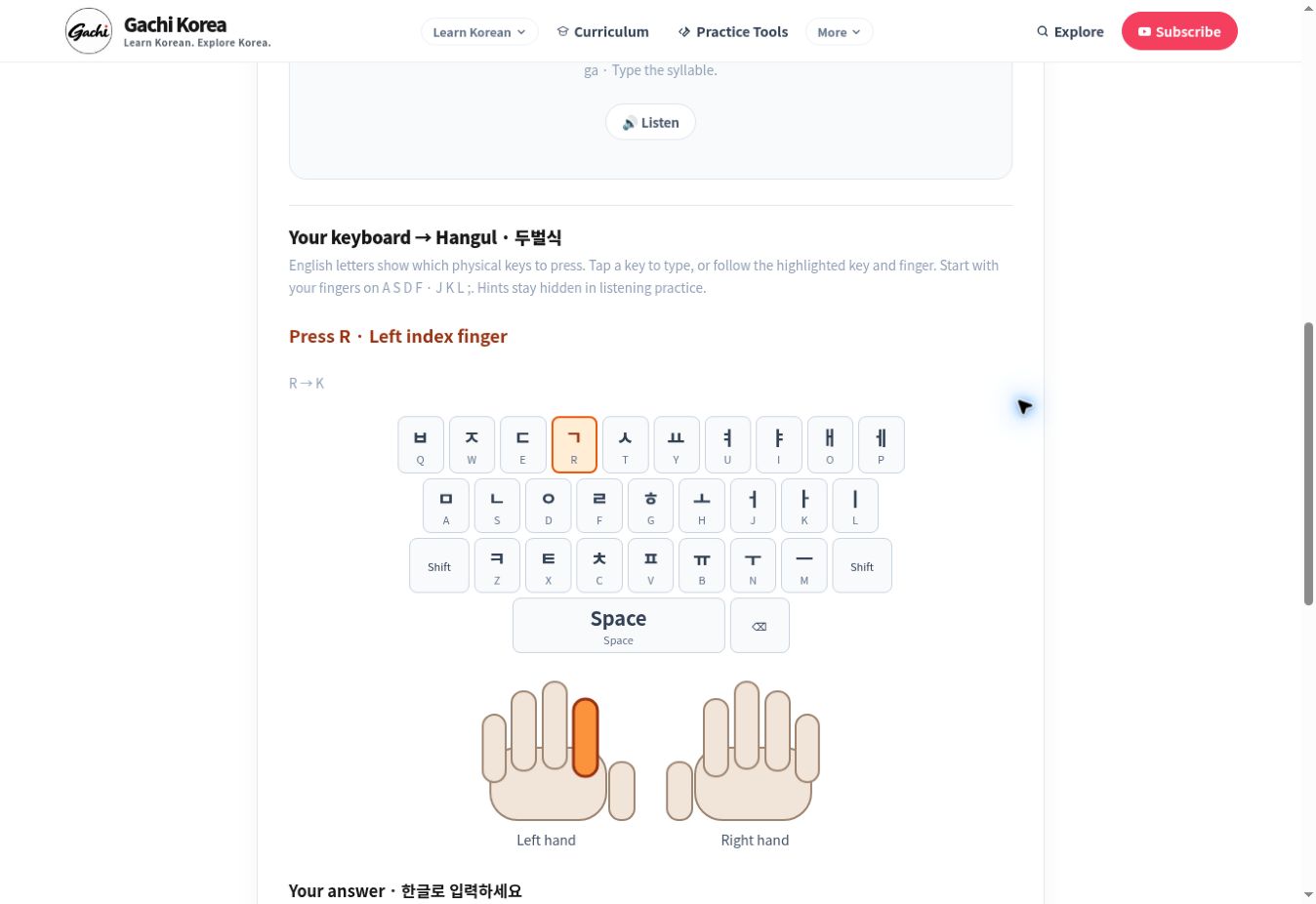
Instead of asking you to memorise the whole layout before starting, the guide helps with the next action. For 가, it first highlights R and the left index finger. After you enter ㄱ, the hint moves to K and the right middle finger. Your answer grows as you follow the sequence.
On a physical keyboard, place your fingers near A S D F and J K L ;. Use the finger picture as a starting guide, then gradually look at it less. On a phone, tap the screen keys or use your device’s keyboard; the ten-finger diagram is intended for physical keyboard practice.
If your entry stops matching the target, the app asks you to check it rather than highlighting an unrelated next key. Use Backspace to correct the entry. In the built-in English-key mode, Backspace can remove one component of the current syllable, so 가 can become ㄱ again.
How the Korean keyboard layout works
The guide follows two-set Korean, or 두벌식 (dubeolsik). Each letter key has a Hangul assignment. The English labels below describe the familiar QWERTY positions; they are not translations of the Korean sounds.
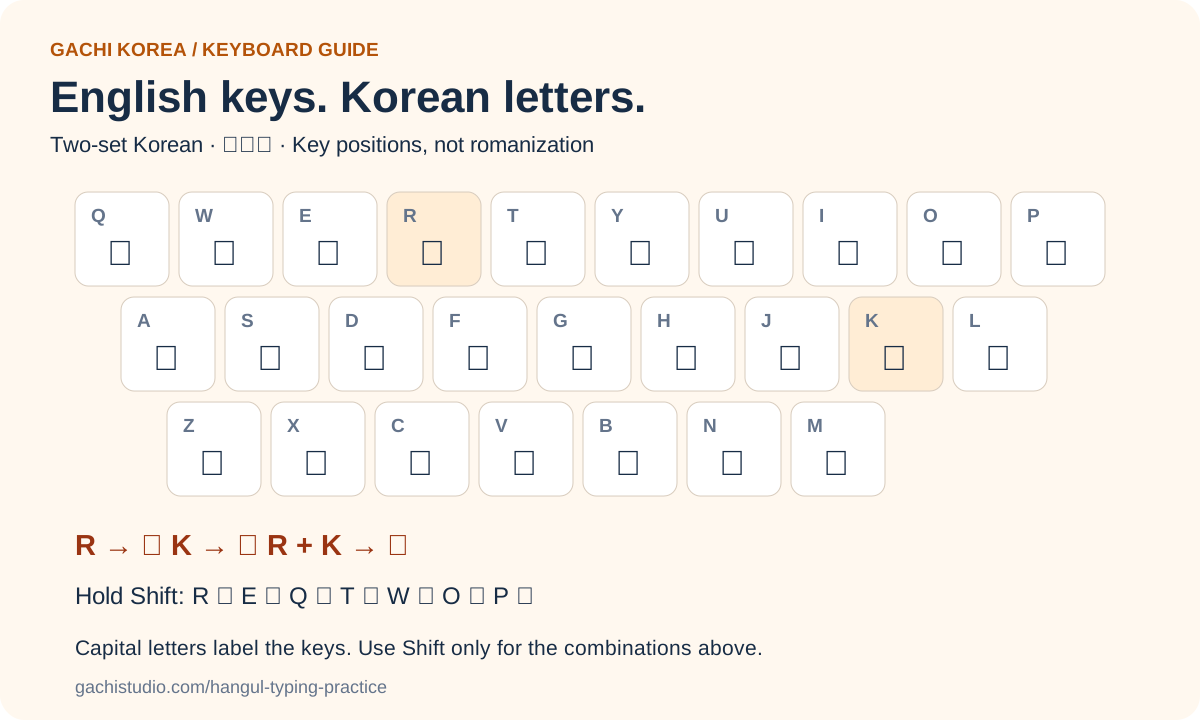
Here are five useful combinations to try as you learn the layout:
| Hangul | Components | English key sequence |
|---|---|---|
| 가 | ㄱ + ㅏ | R → K |
| 나 | ㄴ + ㅏ | S → K |
| 아 | ㅇ + ㅏ | D → K |
| 물 | ㅁ + ㅜ + ㄹ | A → N → F |
| 학교 | ㅎ + ㅏ + ㄱ / ㄱ + ㅛ | G → K → R → R → Y |
Uppercase labels in this table name the keys. Press them normally unless Shift is explicitly shown. For example, Shift + R produces ㄲ, while R alone produces ㄱ.
For a word such as 학교, enter its components in order without adding a space between 학 and 교. The input method arranges the letters into blocks. Add spaces between words when the sentence requires them.
What if your keyboard is AZERTY or another layout? The app’s physical-key guide follows QWERTY positions. Labels printed on a different keyboard may not match those positions. Use the on-screen keyboard when you want an unambiguous visual match, or practise with your device’s Korean input method.
Choose a level that gives you a useful challenge
The practice levels serve different purposes:
| Level | What you practise | Audio option |
|---|---|---|
| Letters | 14 basic consonants and 10 basic vowels | Recorded letter names or vowel sounds |
| Syllables | Ten simple syllables, including 가, 나 and 다 | Recorded syllables |
| Words | Ten beginner words, including 물, 집 and 학교 | Recorded words |
| Numbers | Native Korean numbers 하나 through 열 | Recorded numbers |
| Short sentences | Eight sentences, including 안녕하세요 and 저는 학생이에요 | Copy typing only |
Start with Letters if finding ㄱ or ㅏ still takes effort. Choose Syllables when you can identify individual letters but need help combining them. Move to Words when you are ready to practise final consonants and changing between blocks.
The visible keyboard also includes keys for additional vowels and Shift combinations. That does not mean every combination has a dedicated exercise in the current question bank. The built-in levels are a beginner starting point, not a complete Korean course.
Copy first, then try listening dictation
In Copy typing, the target stays visible. Your task is to notice the spelling, locate the keys and enter the same Korean text. This is a useful place to make mistakes slowly and learn how to correct them.
In Listen & type, press Listen, then enter what you hear. The target, romanization, key sequence and next-finger hints are hidden until you reveal the answer. Otherwise the keyboard hint would give away the spelling you are trying to retrieve.
Use Slow audio if you need another listening pass. A replay is a normal part of practice; there is no countdown forcing you to guess. Short sentences currently have no recordings, so selecting that level keeps the activity in copy mode.
Show answer is available when you are stuck. It marks that item for review, so using support does not disappear from the session result. You can type the answer again or move on and revisit it later.
Understand your score before trying to get faster
The result is first-check accuracy: how many items you answered correctly before a wrong check or an answer reveal. If you make a mistake and then fix it, the app recognises the correction, but the item still goes into your review list.
This makes the score useful for choosing your next practice target. A lower score might mean you need to review one vowel, a final consonant or a particular key position. It is not a judgement of your overall Korean ability.
The timer shows session duration. It is not a words-per-minute test, and it does not assess speaking. After the final question, select Practise mistakes to work through the items that needed support.
A five-minute beginner routine
Try this short routine as a manageable starting point, then adjust it to your pace:
- Minute 1: copy a few letters with the key and finger hints visible.
- Minutes 2–3: practise syllables or words. Say the components to yourself if that helps you notice their order.
- Minute 4: hide the hints, or try listening dictation at a level with recordings.
- Minute 5: review the mistakes. Name one thing to watch next time, such as “K is ㅏ” or “물 ends in ㄹ.”
The purpose is a small, observable improvement. Copying correctly with support and recalling the spelling without support are different achievements. Practise both, instead of using speed as the only measure of progress.
How does typing connect to Hangul stroke order?
Hangul stroke order teaches how to move a pen when writing a letter. Korean typing practice teaches how to enter its components on a keyboard. Typing ㄱ takes one letter-key press; handwriting ㄱ involves a connected movement across and down. A key sequence is not a pen-stroke sequence.
If the letter shapes are unfamiliar, start with our Hangul stroke-order practice tool and seven common Hangul writing mistakes. Next, use Let’s Build Hangul to explore consonant–vowel combinations. Then return here to type the letters you can recognise.
For paper practice, the Gachi Korea consonant workbook guide explains the companion Trace, Copy and Recall routine. The workbook is a paid resource; the online typing tool is free.
Korean typing questions beginners often ask
Do I need a keyboard with Hangul printed on it?
No. In this app, the English-key mode provides Hangul input and a visual mapping. To type Korean in other programs, add a Korean keyboard through your device’s settings. The physical keys do not need Korean labels.
Do I need to download a Korean keyboard?
Not to use the app’s built-in English-key mode or on-screen keys. For typing outside the app, your device may need to add or download its Korean language input components. See the device setup guide.
Can I practise on my phone?
Yes. Select Mobile and tap the on-screen keys, or choose your device’s Korean keyboard as the input method. The on-screen practice layout is two-set Korean; your phone may offer other layouts too.
Why is typing “ga” not giving me 가?
Because this is a keyboard-position system, not romanization input. Use R → K for 가. The romanization hint helps with reading; the English key labels help with typing.
Can the app check my pronunciation?
No. It checks the Korean text you enter. Listening dictation is available for recorded levels, but microphone recording and pronunciation scoring are not part of this tool.
Try your first ten questions
Free Korean typing practice—start with the keyboard you have
See the Hangul letter, follow the key and finger guide, then check your answer. Start with Copy typing and Syllables.
Start Hangul Typing Practice →